
Jan 12 2012
If you're using an automotive data provider for VIN decoding, you probably have a few vehicles in inventory that your data provider cannot decode. Some of these might be classic cars, vehicles sold in Europe or Asia then imported into the US, Trailers, or other types of vehicles that your data provider simply does not support. However, it's likely that some of these vehicles cannot be decoded because the VIN number is just plain incorrect, usually due to human error when reading the VIN off the vehicle. Fortunately, there are a number of ways to determine a VIN is invalid. You can employ these methods to isolate your invalid VINs and either make automated corrections or go back to the field to get the correct VIN off your vehicle.
Checking VIN length is a great first line of defense for your VIN data. With the exception of vehicles produced prior to model year 1981, VIN numbers must be 17 digits long. If you have VINs that are shorter than 17 characters, and you don't work with inventory older than 30 years, they're invalid.
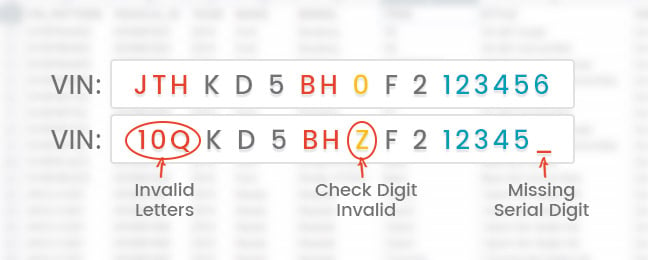
VINs can include any alphanumeric characters except for the letters I, O, and Q. These letters have been excluded from the VIN standard to avoid confusion with the numbers one and zero. Additionally, the 9th digit of the VIN must be either a numeric digit (0 through 9) or the letter X.
If you have VINs in your inventory that include the letters I, O, or Q, you could try replacing the letter I with the number one, and the letters O and Q with the number 0. You can run your new VIN through the VIN Checksum Algorithm described below to help ensure its accuracy.
For US and Canada-destined vehicles, the ninth digit of the VIN is actually not used to help identify the vehicle itself. Rather, it is a special code that can be compared to the result of an error-checking algorithm to determine if the VIN is invalid.
The error-checking algorithm is comprised of five fairly simple steps, which are described below.
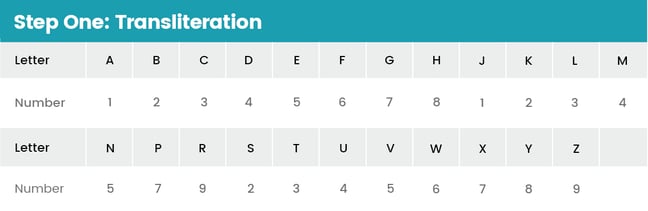
To begin, you must convert each letter character in your VIN to a number using the transliteration table below. Remember that the letters I, O, and Q are not allowed in a VIN.
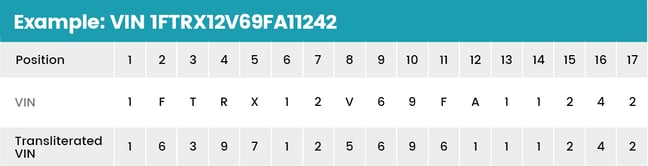
The next step is to multiply each transliterated VIN character by a weighted factor. The table below shows the weight factor for each position.

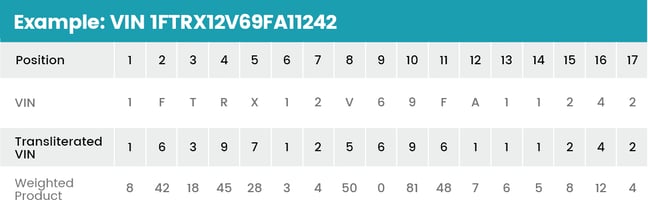
After computing the weighted product for each position of the VIN, add all of these weighted products together.

Once you have a sum of weighted products, you need to compute the remainder of the weighted sum divided by 11. This can be done easily using the modulo operator in any programming language:

Finally, compare the remainder found in step 4 to the check digit (the ninth character of the VIN). If the remainder is zero through nine, the remainder and check digit should match exactly. If the remainder is 10, the check digit should be "X." If the remainder and check digit do not match, the VIN is invalid.
Armed with the three strategies listed above for finding invalid VINs in your inventory, you can isolate your incorrect VINs and work to replace them with valid VINs, improving the overall quality and value of your inventory data. Find out more about VINs and VIN Decoding in our VIN Decoding 101 Series of articles.